Mempercepat Booting Winxp

19 Juli 2010


ikutin langkah-langkahnya
  1. Buka notepad.exe, ketik "del c:\windows\prefetch\ntosboot-*.* /q" dan save as "ntosboot.bat"di c:\
  2. Klick start menu, pilih "run " dan ketik "gpedit.msc".
  3. Klik dua kali "Windows Settings" dibawah "Computer Configuration" dan dua kali klik lagi "Shutdown" di kanan jendela window.
  4. Buka window /jendela baru klik "add", "browse", lokasi "ntosboot.bat" yang disimpan (langkah 1) dan klik "open"
  5. Klik "ok", kemudian di "apply" dan "OK" sekali lagi
  6. Dari start menu , pilih " Run.." dan ketik "devmgmt.msc".
  7. Dua kali klik di "IDE ATA/ATAPI controllers"
  8. Klik kanan di "Primary IDE channel" dan pilih "Properties"
  9. Kemudian pilih "Advanced Settings" kemudian ditab device atau 1 jika tidak ada 'device type' centang 'none' pilih 'autodetect' dan klik  "OK".
  10. Klik kanan di "Secondary IDE channel", pilih "Properties" dan ulangi langkah 9.
  11. Restrat komputer kamu
Selamat mencoba

Callum Welsh


Evol from Callum Welsh on Vimeo.

This is a short animated film produced at the University of Hertfordshire for our final degree project and is the result of 3 months of pre-production and 5 months of production.

The film centres around a man looking for an illusive phoenix feather to complete his collection, but after an unfortunate encounter finds himself in need of help. Even after the utmost sacrifice of the phoenix, the man's lust for greed triggers the phoenix's magnificent rebirth through his soul.

Art/Story Director: Callum Welsh
www.callumwelsh.co.uk

Animation Director: James Ogden
www.jamesogden.co.uk

Original Score: Julian Cole
www.juliancole.co.uk

Additional Credit:

Sound Design: Joshua J Green
Technical Director: Ryan Spencer
Titles/Credits Design: Miguel Santana da Silva
Additional 2D Artwork: Melanie Horn

Special thanks to Martin Bowman, lecturer at the University of Hertfordshire.

Trip around Venezia

Around Venezia from Icam on Vimeo.

Trip around Venezia with 5DMark2, Burano is a fantastic island for the color's

How to feed the world

18 Juli 2010

a film directed by Denis van Waerebeke for the « Bon appétit » exhibition,
aimed mainly at the kids aged 9 to 14.

written by : Sabrina Massen & Denis van Waerebeke
design : Montag /// animation : Juliette Hamon-Damourette
sound design : Ruelgo /// voice : Mark Jane

production Montag for the french « Cité des sciences et de l'industrie »
CSI team: Dorothée Vatinel, Maud Gouy, Manon Courtay, Alisson Boiffard
CSI production: Sabrina Massen

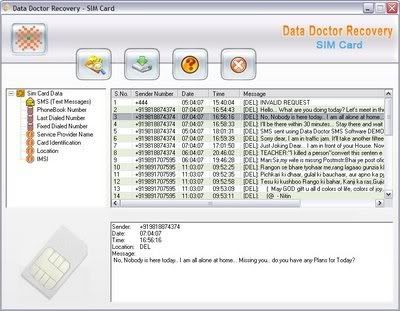
SIM Card Data Recovery 4.0 Full


Sim Card Data Recovery Software program untuk merecovery data yang hilang atau terhapus di sim card handphone (text message dan nomor telephone). SIM card undelete file utility bisa juga mengembalikan data yang hilang diakibatkan oleh virus, software/hardware malfunctioning, rusaknya sim card, kesalahan dalam pemakaian dan kesalahan lain yang mengakibatkan hilangnya data. Professional sim card data restoration dengan tambahan fitur advantage untuk mengembalikan data walaupun sim card dikunci/blokir atau rusak. Program ini sangat mudah digunakan dan bisa mengembalikan data/informasi yang ada di sim card.

Apa yang dilakukan DRPU Sim Card Data Recovery Software ?

DRPU Sim Card Data Recovery Software dapat mengembalikan data akibat human error yang mengakibatkan terhapusnya data nomor telephone dan sms  dari sim card yang tidak dapat digunakan atau corrupt sim card dengan menggunakan Sim card reader. Mudah dan  sangat handal.

Sangat mudah digunakan untuk digunakan dan dapat mengembalikan semua informasi termasuk:

- Text messages from inbox, out box, draft and sent item folder
- Phone book contact numbers saved in cell phone and sim card memory
- Sim ICC (identification) number
- SIM card service provider name
- Mobile IMEI number


Keistemewaan Software:
* Easy to use sim card recovery software recovers deleted phone numbers and sms in original form.
* Application can restore data even if sim card is blocked or not accessible.
* Reliable software fetches the other sim card information including sim ICC number, service provider name and mobile IMEI number by using SIM card reader.
* Facilitate to identify the last dialed and received numbers with call duration.
* GUI based software utility provides highly interactive user interface.
* No more technical knowledge is required to working with Sim card data recovery software.
 
Download Here 

Full = SIM Card Data Recovery 4.0 + Phoenix Service


How to Install:
1) Unpack
2) Install
3) Register with either of these serials:
keys download here

23 Ways To Speed WinXP, Not only Defrag


Since defragging the disk won't do much to improve Windows XP performance, here are 23 suggestions that will. Each can enhance the performance and reliability of your customers' PCs. Best of all, most of them will cost you nothing.
  1. To decrease a system's boot time and increase system performance, use the money you save by not buying defragmentation software -- the built-in Windows defragmenter works just fine -- and instead equip the computer with an Ultra-133 or Serial ATA hard drive with 8-MB cache buffer.
  2. If a PC has less than 512 MB of RAM, add more memory. This is a relatively inexpensive and easy upgrade that can dramatically improve system performance.
  3. Ensure that Windows XP is utilizing the NTFS file system. If you're not sure, here's how to check: First, double-click the My Computer icon, right-click on the C: Drive, then select Properties. Next, examine the File System type; if it says FAT32, then back-up any important data. Next, click Start, click Run, type CMD, and then click OK. At the prompt, type CONVERT C: /FS:NTFS and press the Enter key. This process may take a while; it's important that the computer be uninterrupted and virus-free. The file system used by the bootable drive will be either FAT32 or NTFS. I highly recommend NTFS for its superior security, reliability, and efficiency with larger disk drives.
  4. Disable file indexing. The indexing service extracts information from documents and other files on the hard drive and creates a "searchable keyword index." As you can imagine, this process can be quite taxing on any system.The idea is that the user can search for a word, phrase, or property inside a document, should they have hundreds or thousands of documents and not know the file name of the document they want. Windows XP's built-in search functionality can still perform these kinds of searches without the Indexing service. It just takes longer. The OS has to open each file at the time of the request to help find what the user is looking for. Most people never need this feature of search. Those who do are typically in a large corporate environment where thousands of documents are located on at least one server. But if you're a typical system builder, most of your clients are small and medium businesses. And if your clients have no need for this search feature, I recommend disabling it.Here's how: First, double-click the My Computer icon. Next, right-click on the C: Drive, then select Properties. Uncheck "Allow Indexing Service to index this disk for fast file searching." Next, apply changes to "C: subfolders and files," and click OK. If a warning or error message appears (such as "Access is denied"), click the Ignore All button.
  5. Update the PC's video and motherboard chipset drivers. Also, update and configure the BIOS. For more information on how to configure your BIOS properly, see this article on my site.
  6. Empty the Windows Prefetch folder every three months or so. Windows XP can "prefetch" portions of data and applications that are used frequently. This makes processes appear to load faster when called upon by the user. That's fine. But over time, the prefetch folder may become overloaded with references to files and applications no longer in use. When that happens, Windows XP is wasting time, and slowing system performance, by pre-loading them. Nothing critical is in this folder, and the entire contents are safe to delete.
  7. Once a month, run a disk cleanup. Here's how: Double-click the My Computer icon. Then right-click on the C: drive and select Properties. Click the Disk Cleanup button -- it's just to the right of the Capacity pie graph -- and delete all temporary files.
  8. In your Device Manager, double-click on the IDE ATA/ATAPI Controllers device, and ensure that DMA is enabled for each drive you have connected to the Primary and Secondary controller. Do this by double-clicking on Primary IDE Channel. Then click the Advanced Settings tab. Ensure the Transfer Mode is set to "DMA if available" for both Device 0 and Device 1. Then repeat this process with the Secondary IDE Channel.
  9. Upgrade the cabling. As hard-drive technology improves, the cabling requirements to achieve these performance boosts have become more stringent. Be sure to use 80-wire Ultra-133 cables on all of your IDE devices with the connectors properly assigned to the matching Master/Slave/Motherboard sockets. A single device must be at the end of the cable; connecting a single drive to the middle connector on a ribbon cable will cause signaling problems. With Ultra DMA hard drives, these signaling problems will prevent the drive from performing at its maximum potential. Also, because these cables inherently support "cable select," the location of each drive on the cable is important. For these reasons, the cable is designed so drive positioning is explicitly clear.
  10. Remove all spyware from the computer. Use free programs such as AdAware by Lavasoft or SpyBot Search & Destroy. Once these programs are installed, be sure to check for and download any updates before starting your search. Anything either program finds can be safely removed. Any free software that requires spyware to run will no longer function once the spyware portion has been removed; if your customer really wants the program even though it contains spyware, simply reinstall it. For more information on removing Spyware visit this Web Pro News page.
  11. Remove any unnecessary programs and/or items from Windows Startup routine using the MSCONFIG utility. Here's how: First, click Start, click Run, type MSCONFIG, and click OK. Click the StartUp tab, then uncheck any items you don't want to start when Windows starts. Unsure what some items are? Visit the WinTasks Process Library. It contains known system processes, applications, as well as spyware references and explanations. Or quickly identify them by searching for the filenames using Google or another Web search engine.
  12. Remove any unnecessary or unused programs from the Add/Remove Programs section of the Control Panel.
  13. Turn off any and all unnecessary animations, and disable active desktop. In fact, for optimal performance, turn off all animations. Windows XP offers many different settings in this area. Here's how to do it: First click on the System icon in the Control Panel. Next, click on the Advanced tab. Select the Settings button located under Performance. Feel free to play around with the options offered here, as nothing you can change will alter the reliability of the computer -- only its responsiveness.
  14. If your customer is an advanced user who is comfortable editing their registry, try some of the performance registry tweaks offered at Tweak XP.
  15. Visit Microsoft's Windows update site regularly, and download all updates labeled Critical. Download any optional updates at your discretion.
  16. Update the customer's anti-virus software on a weekly, even daily, basis. Make sure they have only one anti-virus software package installed. Mixing anti-virus software is a sure way to spell disaster for performance and reliability.
  17. Make sure the customer has fewer than 500 type fonts installed on their computer. The more fonts they have, the slower the system will become. While Windows XP handles fonts much more efficiently than did the previous versions of Windows, too many fonts -- that is, anything over 500 -- will noticeably tax the system.
  18. Do not partition the hard drive. Windows XP's NTFS file system runs more efficiently on one large partition. The data is no safer on a separate partition, and a reformat is never necessary to reinstall an operating system. The same excuses people offer for using partitions apply to using a folder instead. For example, instead of putting all your data on the D: drive, put it in a folder called "D drive." You'll achieve the same organizational benefits that a separate partition offers, but without the degradation in system performance. Also, your free space won't be limited by the size of the partition; instead, it will be limited by the size of the entire hard drive. This means you won't need to resize any partitions, ever. That task can be time-consuming and also can result in lost data.
  19. Check the system's RAM to ensure it is operating properly. I recommend using a free program called MemTest86. The download will make a bootable CD or diskette (your choice), which will run 10 extensive tests on the PC's memory automatically after you boot to the disk you created. Allow all tests to run until at least three passes of the 10 tests are completed. If the program encounters any errors, turn off and unplug the computer, remove a stick of memory (assuming you have more than one), and run the test again. Remember, bad memory cannot be repaired, but only replaced.
  20. If the PC has a CD or DVD recorder, check the drive manufacturer's Web site for updated firmware. In some cases you'll be able to upgrade the recorder to a faster speed. Best of all, it's free.
  21. Disable unnecessary services. Windows XP loads a lot of services that your customer most likely does not need. To determine which services you can disable for your client, visit the Black Viper site for Windows XP configurations.
  22. f you're sick of a single Windows Explorer window crashing and then taking the rest of your OS down with it, then follow this tip: open My Computer, click on Tools, then Folder Options. Now click on the View tab. Scroll down to "Launch folder windows in a separate process," and enable this option. You'll have to reboot your machine for this option to take effect.
  23. At least once a year, open the computer's cases and blow out all the dust and debris. While you're in there, check that all the fans are turning properly. Also inspect the motherboard capacitors for bulging or leaks. For more information on this leaking-capacitor phenomena.

Following any of these suggestions should result in noticeable improvements to the performance and reliability of your customers' computers. If you still want to defrag a disk, remember that the main benefit will be to make your data more retrievable in the event of a crashed drive.

Rahasia Google


Banyak yang belum tahu rahasia google. Banyak yang tidak mempergunakan google dengan baik. Mereka hanya menambahkahkan  satu keyword atau dua  untuk mencari dan mengharapkan terbaik? Yang mungkin ini cara terbaik dan paling cepat untuk mencari. Google adalah satu mesin pencari yang baik dan menambahkan explorasi di Internetmu. Pencariannya Google digoogle sangat sederhana dengan keywords, Web, dan bahkan judul programnya sendiri. tapi dengan lebih dari 3 milyar halaman di daftar isi bukunya Google, masih perlu disaring lagi untuk mencari apa yang kita.
Oleh karena itu saya mencoba untuk membagi apa aja yang google bisa lakukan.

Nah ini gw kasih codenya.

Syntax Search Tricks


CODE
www.google.com/help/operators.html

CODE
www.google.com/help/features.html#calculator

CODE
www.buzztoolbox.com/google/yellowsearch.shtml

CODE
http://groups.google.com

CODE
http://froogle.google.com

Daftar produk dari  online stores dan Google Catalogs
CODE
http://catalogs.google.com

produk fitur lebih dari lagi 6,000 kertas catalogs pada satu daftar isi buku bisa dicari.
CODE
www.google.com/options/index.html

Google Alert
CODE
www.googlealert.com

CODE
www.google.com/newsalerts

CODE
http://labs.google.com

CODE
http://labs1.google.com/gvs.html

CODE
www.google.com/apis


Situs Download dan Share Video Gratis

Free Video donwload and Upload

Blip.tv VideoEgg Dailymotion YouTube Veoh Google Video Grouper Jumpcut AOL Eyespot Addictingclips, BallOfDirt Blastrop Blinkx Bolt Break CastPost Clipfish ClipShack Crunchyroll Current TV Dabble Daum DropShots Eefoof EngageMedia Evtv1 ExpertVillage Filecow FlickDrop Fligz Flixya Flurl GodTube Gofish GUBA HomeMovie iFilm JibJab LiveVideo Lulu TV ManiaTV Metacafe Motionbox MSN Soapbox Myspace MyVideo OneWorldTV Openvlog Ourmedia Pandora TV Panjea Peekvid Phanfare Pickle Putfile Revver SceneMaker Sharkle Stage6 Sumo TheVideoSense Tudou Twango UVU Video Sharing Veoh Video Webtown VidiLife Vimeo vMix Vobbo Vodpod Vsocial Webshots Woomu Yikers You are ZippyVideos zooppa